

New Features
1. Define and Track Goals for Automation Campaigns
You can now set one measurable goal for each automation to evaluate how effectively your flows drive customer actions. Learn more. Platform All Plan All Channel All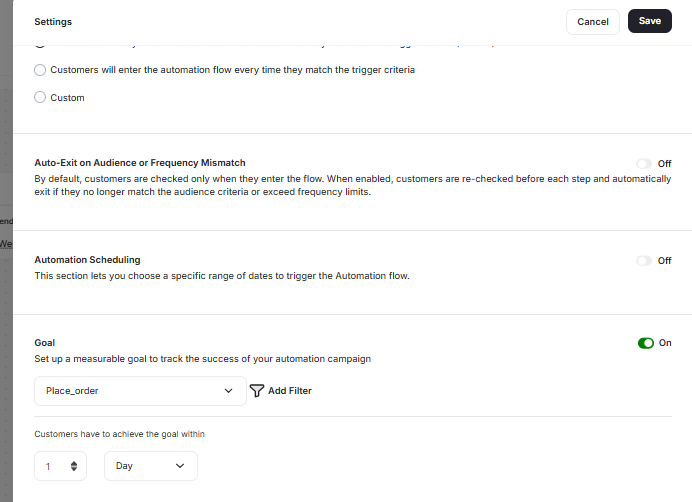
What’s New
-
Goal Setup in Automations
- Each automation now supports defining one goal from any Gameball event (custom or predefined). You can add optional filters (e.g., order value, product category) and set a measurement window such as 7, 14, or 30 days. Goals can be added or edited in draft mode, with changes to published automations applying only to new participants.
-
Automated Goal Tracking for Each Customer
- After a customer completes the automation, Gameball automatically tracks whether they perform the defined goal event within the selected timeframe. Each customer is marked as Achieved, Pending, or Not Achieved, with full visibility inside customer logs.
-
Goal Performance Analytics & Reports
- A new Goal Performance tab has been added to automation insights. It displays total participants, completions, goal achievements, and conversion trends over time. All goal results can be exported to CSV for deeper analysis.
Other Improvements
1. Lead Form Now Supports Custom Customer Attributes
We have enhanced the Lead Form to give you more flexibility and control over the customer data you collect from guest users. You can now enrich the Lead Form with your own custom customer attributes, allowing you to gather more meaningful information beyond the standard fields. Read about how to create and customize lead forms.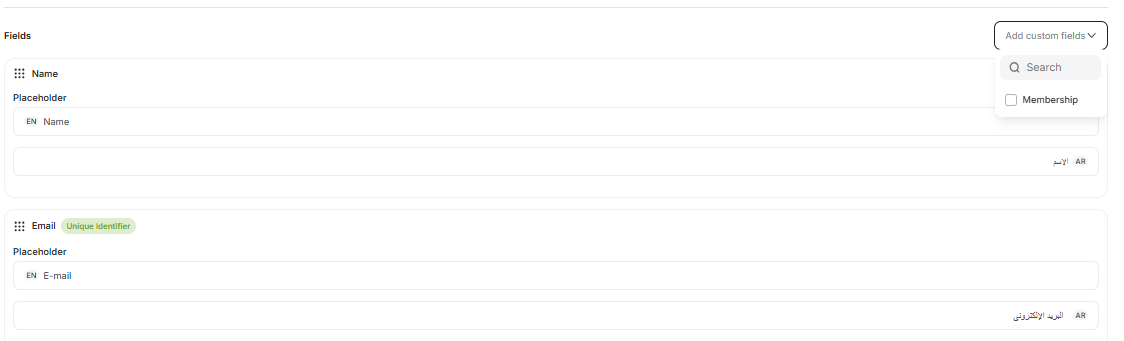
What’s New
- Lead Form now supports up to 5 custom customer attributes: You can include any previously created customer attributes, such as City, Gender, Favorite Product, Age, and more, using a new multi-select dropdown. Custom fields display with the correct input type (text, number, date picker, toggle) and follow all validation rules.
- Full control over field configuration: Rearrange fields, mark them as mandatory or optional, and toggle default fields (Name, Email, Mobile) on/off. Email or Mobile can be selected as the unique identifier, and unique identifiers cannot be removed or set as optional.
- Smarter data handling for guest users: All submitted attributes are saved to the guest’s temporary profile and automatically mapped to their customer profile once they are identified (e.g., login or purchase).
2. Test Push Notifications Inside Automation Campaigns
Preview push notifications directly inside your automation flows. You can now validate the full push notification experience for content, variables, deep links, and delivery without leaving the Automation builder. This helps ensure accuracy and consistency before publishing any automation campaign.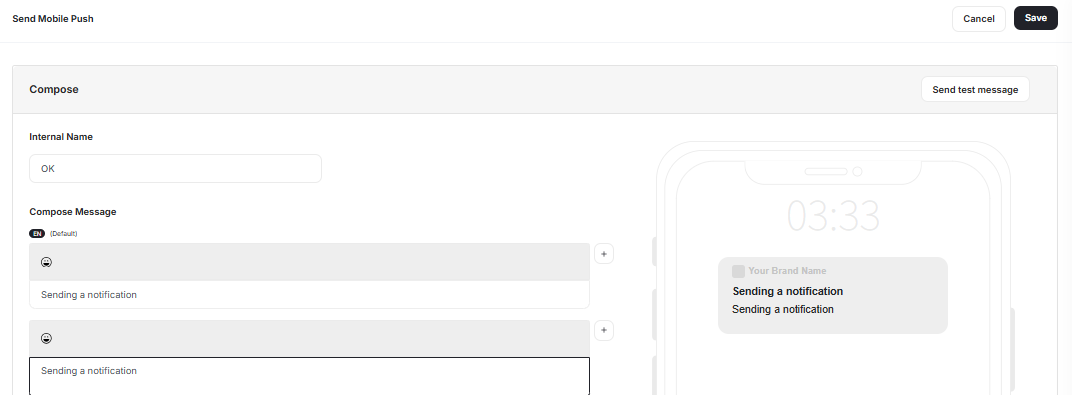
What’s New
-
Send Test Notification Button Inside Automation
- A new “Send Test Notification” button is now available within the Send Push Notification action node, matching the UI/UX and behavior of test pushes in Communication Campaigns.
-
Accurate Preview of Push Content
- Tests use the exact configured notification: title, body, images, deep links, and variables, sent to a selected valid customer/device.
-
Delivery Feedback & Error Handling
- After sending, users receive clear confirmation if successful, or detailed error messages (e.g., invalid device token, integration issues) when delivery fails.
3. Improved Date & Time Display Across Dashboard Tables
We’ve updated how creation dates appear across multiple dashboard pages to make timelines clearer, more intuitive, and easier to interpret at a glance.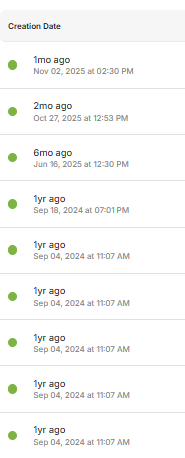
What’s New
-
Readable “time-ago” format
- Creation dates are now shown in a friendly relative format (e.g., 3h ago, 7d ago, 10mo ago, 2yr ago), automatically updating as time passes to keep information fresh and clear.
-
Dual display: relative + exact timestamp
- Under each relative time, users can now see the precise creation timestamp (e.g., Nov 26, 2025, at 02:16 PM), both displayed according to the user’s local timezone.
-
Unified formatting across main dashboard sections
- The new date format is now live on:
- Campaigns → Reward Campaigns
- Customers → Customers
- Customers → Activities
- Customers → Segments
- Settings → Users → Account
- The new date format is now live on: