

Overview
Some businesses prefer to reward customers only on the actual product value, excluding shipping fees and taxes from the rewardable amount.Gameball supports this behavior through a configurable setting. If enabled, Gameball will automatically subtract tax and shipping values before calculating the reward amount.
How to enable the shipping and tax exclusion feature:
- In your dashboard, navigate to Programs → Earn Points from the left-side menu.
- Ensure that both of the following options are enabled by switching on their toggles:
.png)
Why This Matters
Let’s say your customer pays $540, but $40 of that is tax and shipping. If you don’t exclude these values, your loyalty program will over-reward, giving points for money not actually spent on products. That’s why, if you choose to exclude tax and shipping, it’s critical to send complete and accurate values in the Order API, so Gameball can apply deductions correctly.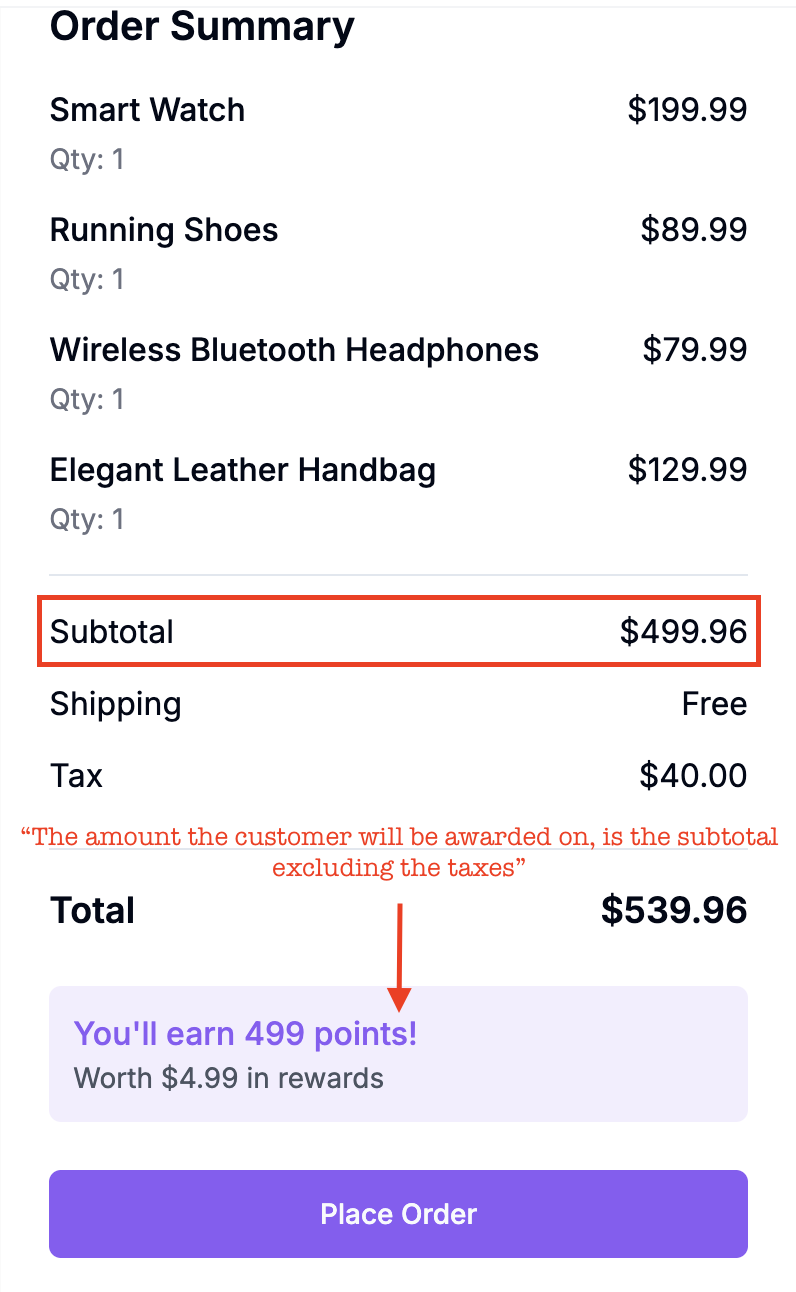
Prerequisites for Using the “Exclude Taxes and Shipping” Feature
To ensure this feature works as expected, your Order API payload must include the following fields:1. totalShipping (Required if feature is enabled)
You must include the totalShipping attribute in your Order API request.- This value is used by Gameball to deduct shipping costs from both totalPaid and totalPrice when calculating rewards.
- Even though totalShipping is optional by default, it becomes mandatory once this feature is activated.
2. totalTax and Item-Level taxes (Required if feature is enabled)
You must send both totalTax and per-item taxes values.- totalTax (order-level): Used to deduct total taxes from totalPaid and totalPrice.
- taxes (item-level): Represents the total tax for that specific line item.
Tax Calculation Clarification:
If an item has a tax of $10 per unit, and the customer buys 2 units, the correct taxes value for that item is:2 × $10 = $20This ensures Gameball calculates tax deductions accurately per product.
Summary of Required Fields (When Feature Is Enabled)
| Field | Required | Description |
|---|---|---|
totalShipping | Yes | Used to deduct shipping from totalPaid and totalPrice. |
totalTax | Yes | Used to deduct taxes from totalPaid and totalPrice. |
lineItems[*].taxes | If lineItems used | Must reflect the total tax for the quantity purchased. |
Example Scenario:
Let’s say a customer places this order:- 2 × Moisturizer at $200 each → Subtotal = $400
- 1 × Tote Bag at $150
- Product Subtotal = $400 + $150 = $550
- Shipping Fee = $50
- Tax on Moisturizer = $10 per unit × 2 = $20
- Tax on Tote Bag = $15
- Total Tax = $20 + $15 = $35
- Total Paid = $550 (products) + $50 (shipping) + $35 (tax) = $635
How Gameball Calculates Rewards
With tax and shipping exclusions turned on, Gameball calculates the rewardable amount as follows:- Start with:
totalPaid = $635 - Subtract shipping:
$635 – $50 = $585 - Subtract tax:
$585 – $35 = $550
Gameball rewards will be calculated based on $550, the actual product value.
What Happens If You Don’t send taxes in Line Items
If you sendtotalTax at the order level but omit the taxes field for each lineItem, Gameball will still work as follows:
-
For merchant-level cashback (general rate):
Cashback will still be calculated correctly; Gameball will subtract
totalTaxfrom the order total before applying the reward. - For collection-based cashback (different rates per collection): Gameball will treat missing taxes values as 0 per line item. Since the item prices are already sent excluding tax, the calculation result will be the same, but per-item accuracy and visibility will be lost.
Rewards will still be calculated correctly overall, but omitting item-level taxes limits the precision of per-product or per-collection reward tracking.Best Practice:
Always include bothtotalTaxandtaxesper item for accurate, collection-level cashback calculations and consistent analytics.
Key Takeaways
Gameball ensures customers are rewarded accurately, only for the true value of products.
- Include
totalShipping,totalTax, and per-lineItemtaxeswhen this feature is active - Ensure the
taxesfield in eachlineItemrepresents the total tax for that product line (unit tax × quantity) - Keep your data complete and consistent to guarantee precise reward calculations