

| Platform | Plan |
|---|---|
| Shopify | Free, Starter, Pro, & Guru |
| Salla | Starter, Pro, & Guru |
| Non-platform clients | Growth & Enterprise |
The Problem Segmentation Solves
Have you ever wanted to create a challenge, send a message, or apply a redemption rule that only applies to a specific group of customers — but could not figure out how to isolate and target them accurately? Even when you managed to identify these customers, applying manual tags became time-consuming and inaccurate, especially since customers’ behavior changes frequently. By the time you have tagged a customer, they may no longer belong to the intended group. To solve this challenge, Gameball introduced Customer Segmentation — a feature that creates dynamic lists of customers who automatically qualify based on the criteria you set.How Customer Segmentation Works
Customer segmentation automatically groups your customers based on their behavior and profile data. Unlike manual tags, segments are dynamic: customers are added or removed in real time based on whether they meet the defined conditions.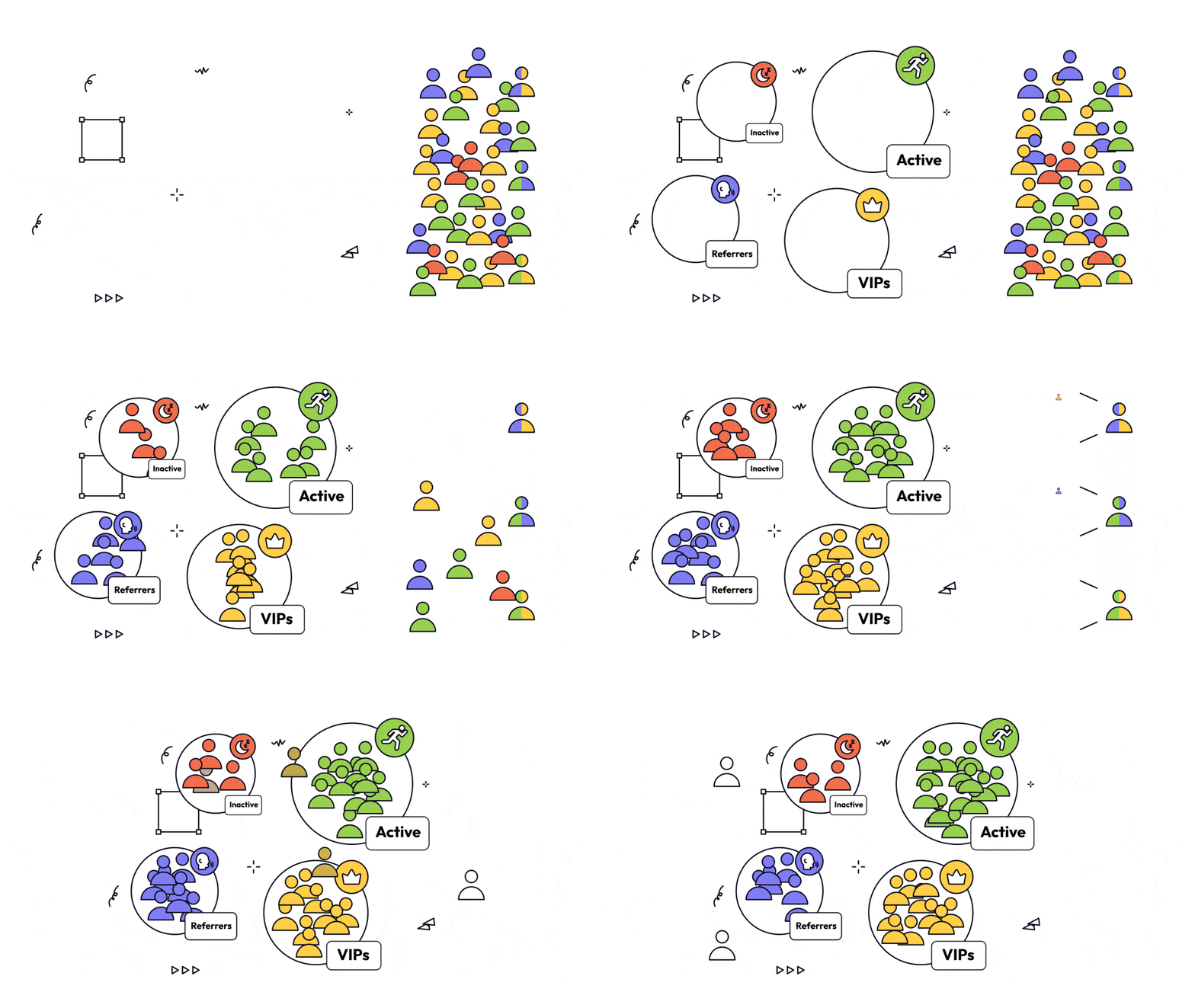
Why Segment Customers?
Segmentation helps you gain valuable insights and execute targeted marketing strategies. With Gameball, you can:- Gain deeper insights into customer behavior.
- Build dynamic, data-driven, and personalized marketing strategies.
- Target specific customer groups across various Gameball features.
Reward Campaigns
Reward only specific segments with tailored challenges and incentives.
Redemption Rules
Apply rules like free shipping to customers within certain segments.
Communication Campaigns
Launch targeted campaigns or send messages to selected segments.
Existing Segments vs. Custom Segments
Gameball provides two built-in segments that help you monitor essential customer behaviors:- Active Users
- Inactive Users
- Last login: within the last 30 days
- OR last order date: within the last 30 days
- Color: Green
- Segment Tag: Active
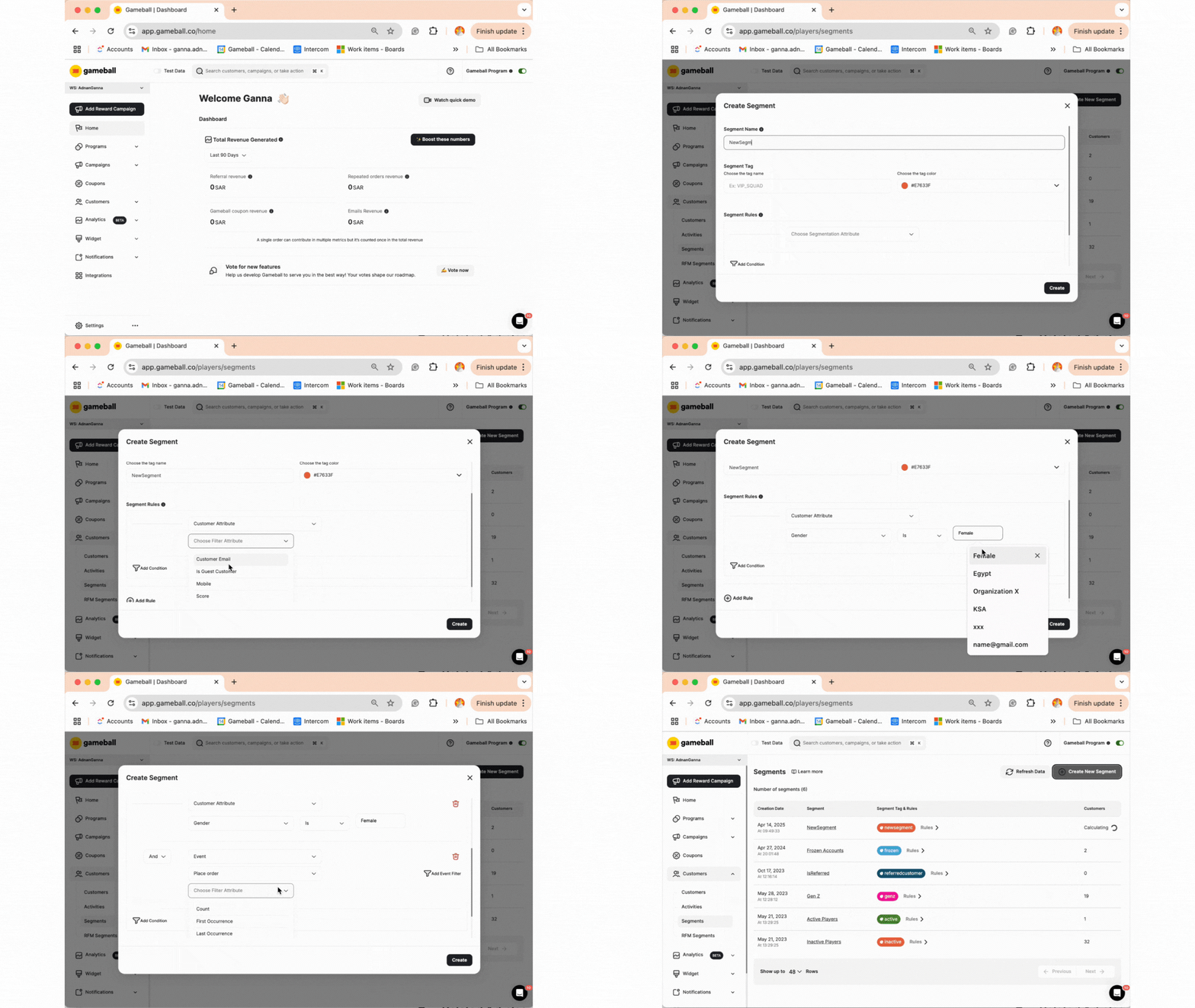
How to Create Segments
Once the segment is saved, Gameball automatically identifies and groups customers who meet all of these criteria.
Segment Usage in Automations
Each segment shows which automation campaigns use it as a trigger — specifically whether it’s used as an Entered Segment or Exited Segment trigger — along with each automation’s live status. This gives you full visibility before making changes, so you can avoid accidentally breaking active automations when editing or deleting a segment.
If a segment is used by one or more active automations, you’ll see them listed directly on the segment’s page. Review these dependencies before making any structural changes to your segment conditions.
Common Questions
Can I use segments across all Gameball features?
Can I use segments across all Gameball features?
Yes, segments can be used with challenges, messages, and redemption rules.
Will customers be added back to a segment if they meet the criteria again?
Will customers be added back to a segment if they meet the criteria again?
Yes, customers are added and removed dynamically in real time.
Can I edit or delete existing segments?
Can I edit or delete existing segments?
Yes, you can modify or delete both system-generated and custom segments at any time.
How is segmentation different from tags?
How is segmentation different from tags?
What is dynamic segmentation?
What is dynamic segmentation?
It means the segment updates in real time. Customers can enter or leave a segment at any time based on their current data.
What does real-time segmentation mean?
What does real-time segmentation mean?
Gameball instantly scans your customer base and updates segments the moment you create or change the rules.
Related Articles
How to Segment Customers
Learn how to create and manage customer segments using the segmentation engine.
Segmentation Use Cases
Explore practical use cases for customer segmentation combined with other Gameball features.
Introduction to RFM Segments
Understand RFM analysis and how Gameball automatically segments customers.