

Accessing Order Details
When an activity is linked to an order (e.g., cashback reward or refund), the order ID will appear as a clickable value directly within the activity log.Find an order-related activity
Locate any activity associated with an order (e.g., Cashback Rewarded, Points Refunded).
What You’ll See in the Order Details
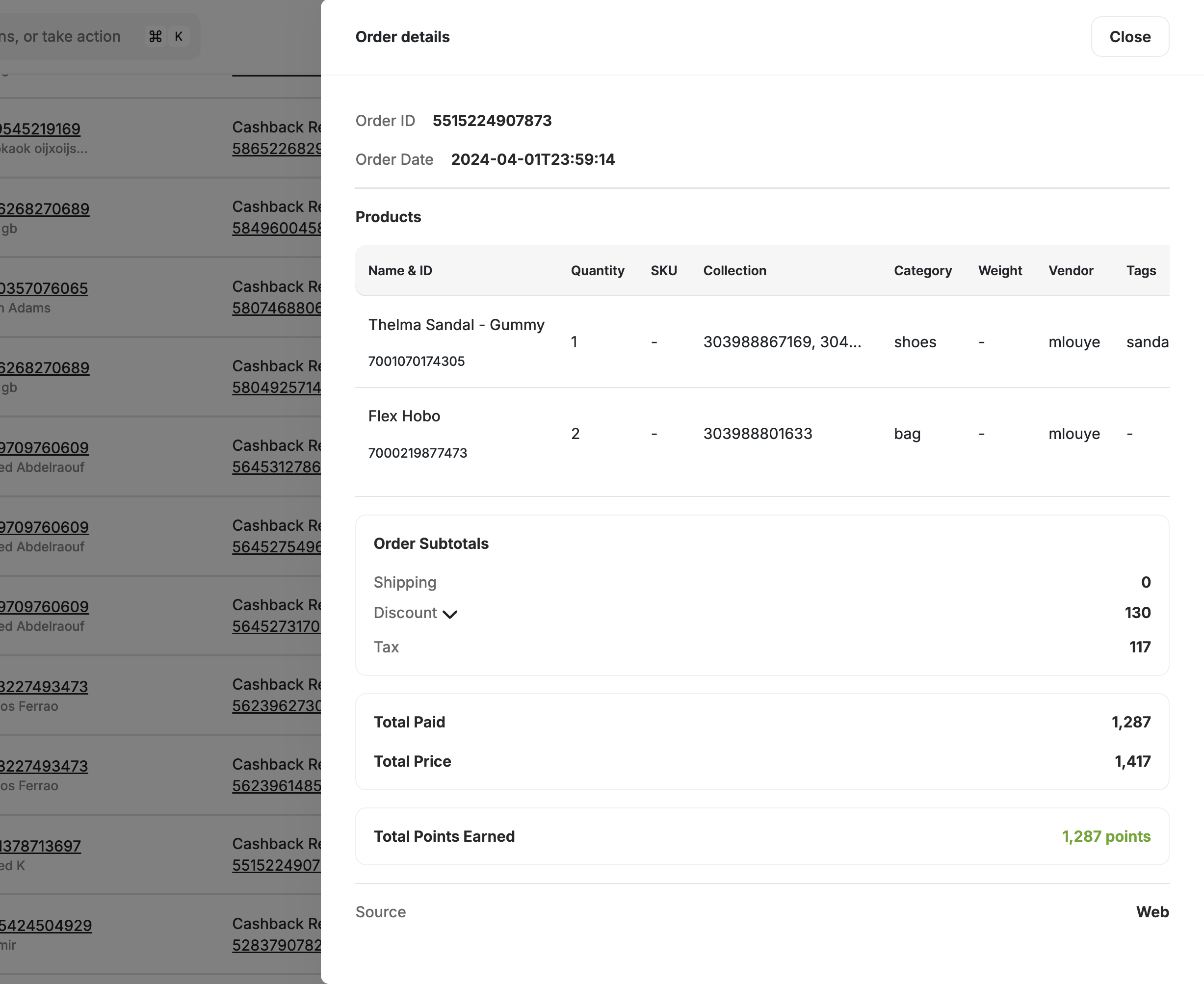
Order Summary
Order Summary
- Order ID and Order Date
- Merchant Name and Branch Name
- Points Redeemed or Points Earned through this order
- Total Paid, Total Price, and Payment Method
Product Breakdown
Product Breakdown
A breakdown of all products in the order, including:
- Name & ID
- Quantity, SKU, Category
- Price, Tax, and Discounts
Order Subtotals
Order Subtotals
- Order Subtotals: shipping, discount, and tax
Viewing Refund Details
If the activity is related to a refund (e.g., Points Refunded):
This allows you to connect refund activity back to the original transaction for full context.
Important Notes
- Clicking an Order ID opens the original transaction summary.
- Clicking a Refund ID shows the refund panel, including a link to the associated order.
- This feature is useful for support agents reviewing customer concerns related to rewards, cashback, or balance changes.
Related Articles
Customer Activity Log
Track customer activities and export logs.
Explore a Customer Profile
View and manage individual customer profiles.