

Step-by-Step Instructions
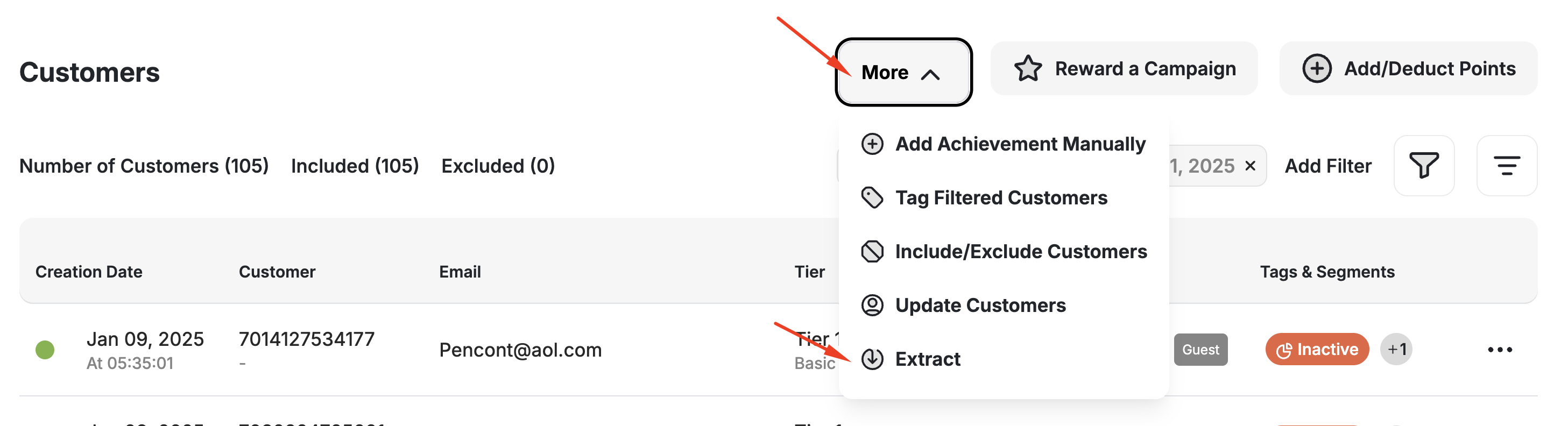
If you need a full export of your entire customer database (not limited by filters), please contact the Gameball support team.
Exported Fields and Their Descriptions
Here’s a description of all the columns included in your exported file:| Column Header | Description | Comment |
|---|---|---|
| customer_id | The unique identifier of the customer in Gameball. | Required for all customer data updates. |
| customer_name | The full name of the customer, if provided. | |
| customer_email | The registered email of the customer. | |
| gender | The gender of the customer. | |
| phone_number | Mobile phone number of the customer. | |
| date_of_birth | Date of birth of the customer. | |
| join_date | Date the customer joined your platform. | |
| creation_date | Date the customer profile was created in Gameball. | |
| country | Country from which the customer registered. | |
| city | Customer’s city. | |
| zip_code | Postal or ZIP code. | |
| preferred_language | Customer’s preferred communication language. | |
| is_guest | Indicates if the customer is a guest. | True = guest, meaning the user has not created a full account. |
| utm_source, utm_medium, utm_campaign, utm_content, utm_term | Tracks how the customer first landed on your site. | Comma-separated. |
| device | The device type used during the customer’s session. | |
| total_amount_spent | Total value of transactions made by the customer. | This field is based on the configured Tiering-up Method. |
| last_order_date | The date the customer placed their most recent order. | |
| total_orders_count | Number of orders the customer has placed. | |
| avg_order_value | Average spend per order. | |
| channel | Source channel where the customer was acquired (e.g., website, mobile app). | |
| current_tier_name | The name of the customer’s current VIP tier. | |
| current_tier_order | The internal order of the customer’s current tier. | |
| score | Used only if your tiering-up method is score-based. | |
| total_points_earned | All points the customer has earned historically. | |
| points | The current total of active, redeemable points. | Pending points are excluded. |
| pending_points | Points that are not yet redeemable due to the return window or pending state. | |
| total_referrals | Number of successful referrals by the customer. | |
| total_redemptions | Number of rewards redeemed. | |
| last_redemption_date | Date the customer last redeemed a reward. | |
| last_login_date | Last time the customer logged into your platform. | |
| last_coupon_usage | Date the customer last used any coupon. | |
| last_gameball_coupon_usage | Date of last coupon issued through Gameball. | |
| last_message_sent_date | Date of the last in-app message sent to this customer. | |
| last_email_sent_date | Date of the last email sent via Gameball. | |
| segments | List of segments the customer belongs to. | Includes both rule-based and RFM segments. |
| Tags | Each exported row displays all tags associated with the corresponding customer. | Supports multiple tags per customer (comma-separated). |
| program_status | Whether the customer is included in or excluded from the loyalty program. | Values: Included or Excluded. Reflects the include/exclude toggle on the customer’s profile. See Include or Exclude Customers. |
You can read more about all customer attributes included in the extracted file through the Customer Profile Attributes article. This also explains how each attribute is added, captured, or calculated by Gameball.
Related Articles
Customer Profile Attributes
Learn about all customer attributes and how they are populated.
Manage Your Customer List
View and manage your full customer list.
Update or Migrate Customers via CSV
Migrate customers from other loyalty programs.
Group Customers Using Tags
Use tags to manually group and target customers.