

Welcome Series Template
Goal
Encourage new customers to complete their first purchase by giving them a surprise gift — a 20% discount — when they create an account.Flow
They receive an email about the discount right away, and if they do not make a purchase within 3 days, they get a reminder email encouraging them to take advantage of the discount.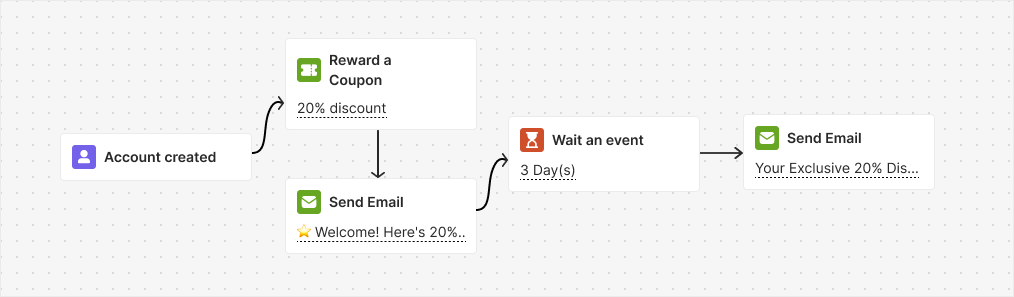
Trigger
Account CreatedInstructions
Ask Repeated Customers for Referrals Template
Goal
Encourage loyal customers (those with more than 2 orders) to refer their friends after making a purchase.Flow
This automation triggers when a customer places an order and waits for 14 days. It then sends an email inviting the customer to refer a friend and earn rewards. If no successful referrals are received within 2 days, a reminder email is sent.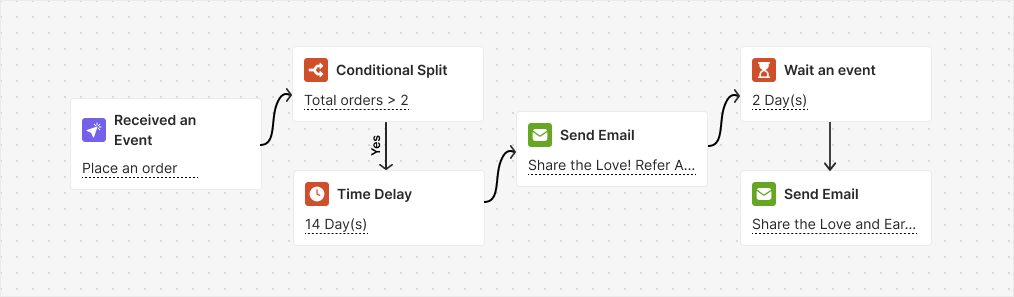
Trigger
Placed OrderInstructions
- Enable the referral program and set up rewards for both your customers and their friends.
- Ensure that you activate the notification emails for both the customer and their friend upon successful referral.
- Adjust the 14-day wait to match your process. It is set to ensure that the customer received the order; change it if needed.
Related Articles
How to Create an Automated Workflow
Step-by-step guide to building and launching automation campaigns.
Introduction to Automation Templates
Overview of all available ready-to-use automation templates.