

Prerequisites
Before starting the integration, ensure the following:- You have an active Gameball account.
- You have an active Attentive account.
- Access to admin permissions in both platforms.
How to Configure Attentive on Gameball
Connect Attentive
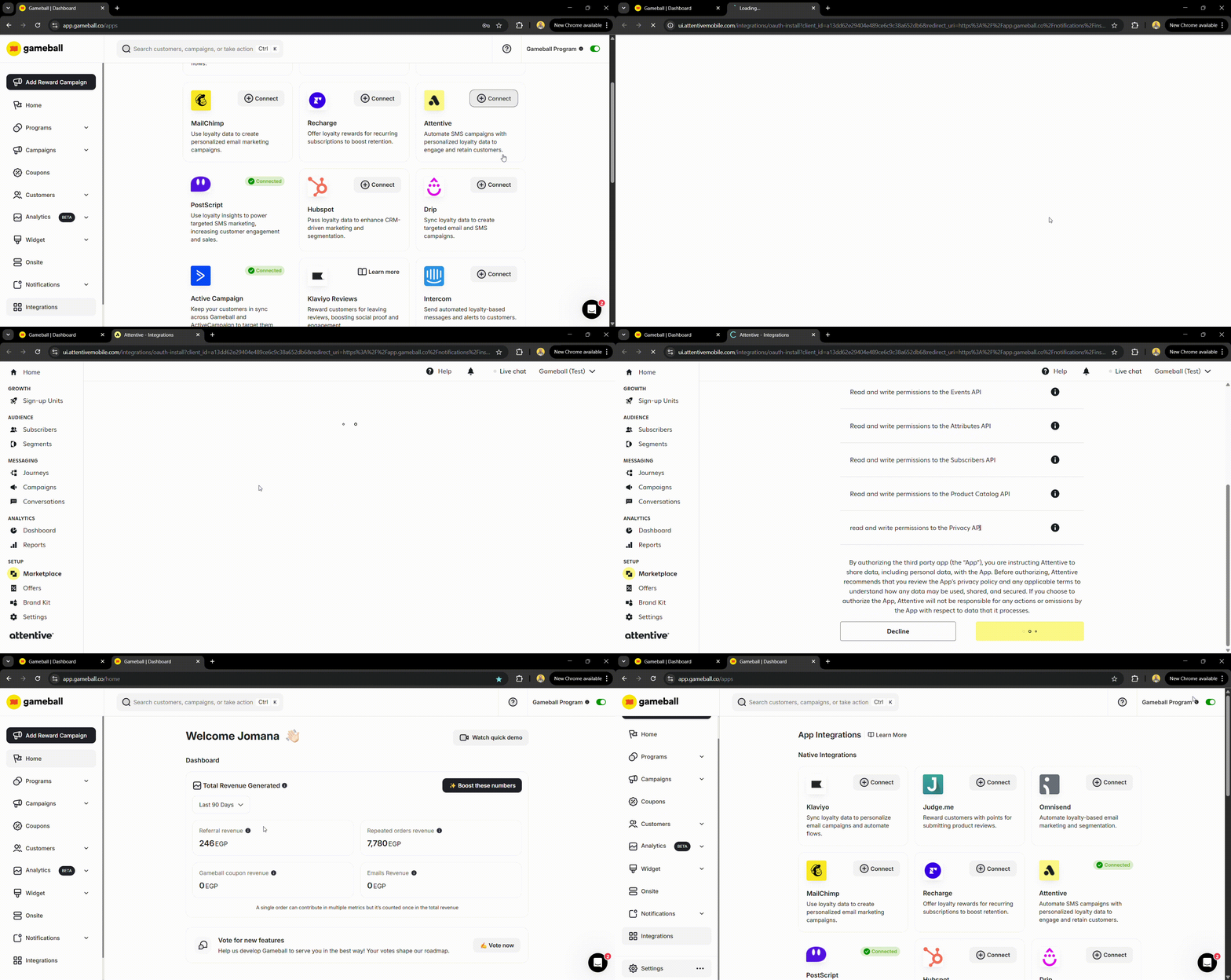
- Log in to your Gameball Dashboard.
- Navigate to the Integrations section from the left menu.
- Select Attentive and click Connect, then Next.
- You will be redirected to the Attentive dashboard. Scroll down and click Authorize.
- Go back to the integration section on the dashboard to ensure that the Attentive app is now connected to your Gameball account.
Configure Synced Customer Data
The following customer attributes are synced to Attentive:
Save your settings once configured.
| Attribute | Description |
|---|---|
| Customer ID | Unique customer identifier |
| Date of Birth | Customer’s birthday |
| Join Date | When the customer joined |
| Tier Name | Current loyalty tier |
| Wallet Points | Available points balance |
| Pending Points | Points awaiting confirmation |
| Tier Progress | Progress toward next tier |
| Tier ID | Current tier identifier |
| Completed Reward Campaigns | Number of completed campaigns |
| Referral Code | Customer’s referral code |
| Referral Link | Customer’s referral link |
| Tags and Segments | Assigned tags and segments |
Test the Integration
Before launching your campaigns, test the integration to ensure it works as expected:
- Perform a test action in Gameball (e.g., award points to a test user).
- Check if the event appears in Attentive under the corresponding profile.
- Send a test SMS using the synced data in Attentive.
Create SMS Campaigns in Attentive
Now that the integration is live, use Gameball data to personalize your Attentive campaigns:- Navigate to Campaigns in Attentive.
- Create a new campaign and select your target audience based on Gameball data (e.g., customers who achieved a certain tier or redeemed rewards).
- Use dynamic variables (e.g.,
{total_points},{current_level}) to personalize your messages. - Launch your campaign.
Troubleshooting
If you encounter issues:- Verify that the API key and webhook URL are correctly configured.
- Check the integration logs in Gameball for error messages.
- Contact Gameball support or Attentive support for further assistance.
Frequently Asked Questions
What happens if my Gameball data doesn't sync immediately with Attentive?
What happens if my Gameball data doesn't sync immediately with Attentive?
We’ve built a retry mechanism for quick data synchronization. However, if you encounter delays, check your integration settings or contact support.
Will my customer data be secure?
Will my customer data be secure?
Yes, only Gameball-related loyalty data is passed to Attentive, ensuring data safety and compliance with privacy regulations.
Gameball on MoEngage
Integrate Gameball with MoEngage for engagement campaigns.
Gameball on Shopify Flow
Automate loyalty workflows with Shopify Flow.