

| Platform | Plan |
|---|---|
| Shopify | All |
| Self-serve | All |
Why Integrate Klaviyo with Gameball?
By integrating Klaviyo with Gameball, you unlock the ability to target and segment customers based on their loyalty to your app. This powerful integration allows you to:- Segment contact lists based on Gameball customer attributes (e.g., points balance, tier) and events created.
- Send personalized emails by including loyalty-related data, such as customer tier and reward points, in your email templates.
- Track and trigger campaigns based on specific customer events, such as coupons created, orders placed, and reward achievements.
How to Configure Klaviyo on Gameball
Ensure Your Widget is Published
Not publishing the widget could impact the integration process, so ensure it’s live before proceeding.

Connect Klaviyo
Click Connect under Klaviyo. If you are on Shopify, make sure Klaviyo is installed through the Shopify App Store.
Create an API Key in Klaviyo
- In your Klaviyo account, go to Account Settings > Settings > API Keys.
- Create a new API key and ensure full access for each API scope.
Copy and Paste the API Key
- Copy the generated API key from Klaviyo.
- Go back to your Gameball dashboard, paste the key, and click Next.
Set Up a Webhook in Klaviyo
Webhooks allow Gameball to send real-time data to Klaviyo.
- Log in to your Klaviyo Dashboard.
- Go to Account Settings > Webhooks.
- Click Create Webhook.
- Provide a name (e.g., “Gameball Integration”).
- Enter the Webhook URL provided by Gameball in the integration section.
- Save the webhook.
Map Gameball Events to Klaviyo
Gameball tracks various customer events (e.g., points earned, redeemed, tiers achieved). Map these events to Klaviyo to use them in your campaigns.
- In the Gameball Dashboard, go to Integrations.
- Select Klaviyo from the list.
- Map the following events:
- Coupon Created
- Coupon Redeemed
- Reward Campaign Achieved
- Order Placed
- Confirm the event mappings and save.
Sync Customer Data
Syncing customer data ensures Klaviyo receives real-time updates about customer actions.
- In the Gameball Dashboard, navigate to Integrations > Klaviyo.
- Enable the Customer Sync toggle.
- Choose the customer attributes to sync (Customer ID, Date of Birth, Join Date, Tier Name, Wallet Points, Pending Points, Tier Progress, Tier ID, Completed Reward Campaigns, Referral Code, Referral Link, Tags and Segments).
- Save your settings.

Using Gameball Data in Klaviyo
View Custom Properties
In Klaviyo, view Gameball customer attributes under Profile > Information > Custom Properties of a specific customer.Use Attributes in Campaigns
When creating a campaign in Klaviyo, insert Gameball attributes by selecting Insert Property.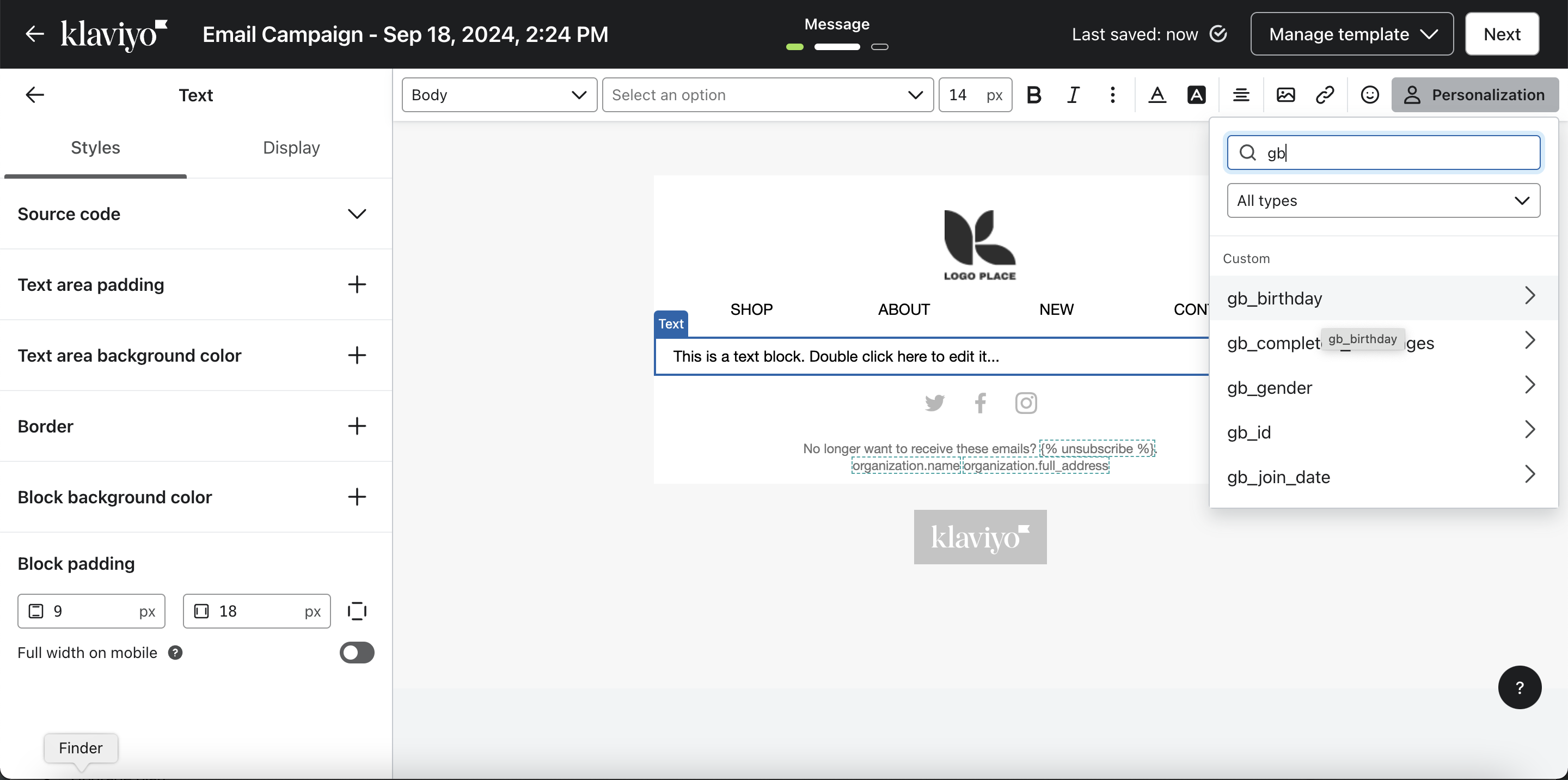
Trigger Flows Based on Events
You can trigger automated flows in Klaviyo based on real-time Gameball events such as Coupon Created, Coupon Redeemed, Reward Campaign Achieved, Order Placed, and Points Redeemed.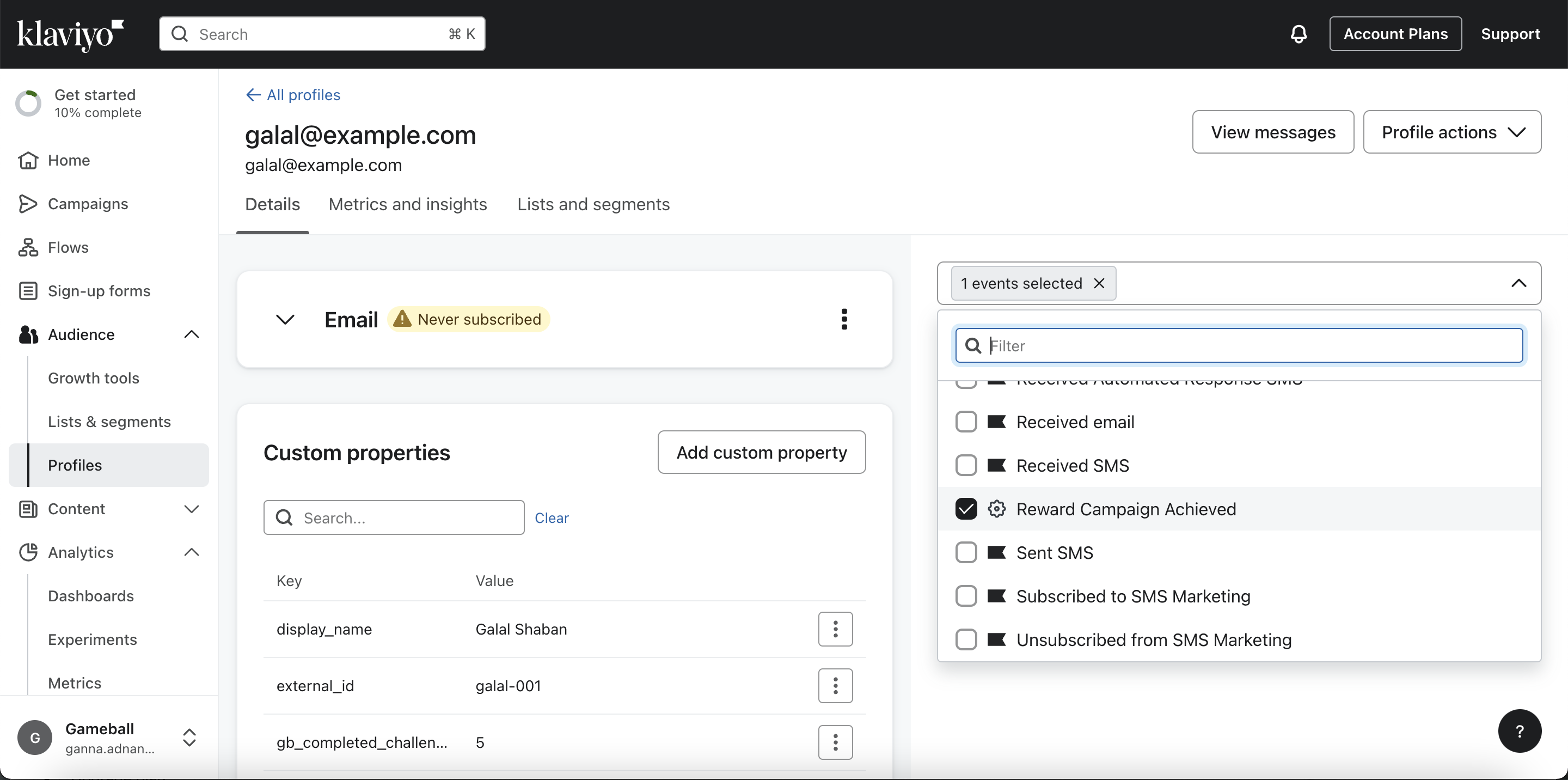
Gameball on MoEngage
Integrate Gameball with MoEngage for engagement campaigns.
Apps & Integrations Overview
Explore all available Gameball integrations.