

Why Integrate Bloomreach with Gameball?
By integrating Bloomreach with Gameball, you unlock the ability to target and segment customers based on their loyalty to your app. This powerful integration allows you to:- Segment contact lists based on Gameball customer attributes (e.g., points balance, tier) and events created.
- Send personalized emails by including loyalty-related data, such as customer tier and reward points, in your email templates.
- Track and trigger campaigns based on specific customer events, such as coupons created, orders placed, and reward achievements.
Data Import Scenarios
The integration between Gameball and Bloomreach ensures that your customer data is always up-to-date. Gameball’s customer attributes will be imported into Bloomreach whenever a customer is created or performs any action.Customer Attributes Sync
Customer Attributes Sync
Trigger: Upon customer creation or after any new action (e.g., achievement, transaction, points expiry).Gameball’s customer attributes will be imported and updated in Bloomreach automatically. The following data is synced:
| Category | Attributes |
|---|---|
| Profile | ID, Email, Join Date, Mobile Number, Birthday, Gender |
| Points | Points Balance, Pending Points, Earned Points, Redeemed Points, Expired Points |
| Tiers | Current Level Name, Current Level Order, Next Level, Next Level Threshold, Level Progress, Progress to Achieve Next Level |
| Orders | Last Order Awarded Points, Average Basket, Number of Transactions, Transactions Amount (Last Rolling Year), Total Net Amount, Unit per Transaction, Date of First/Last Transaction |
| Referrals | Referral Code, Referral Link |
| Coupons | Latest Created Coupon, Latest Used Coupon |
| Segments | Tags, Segments, RFM Segments |
| Other | Count of Rewarded Campaigns, Starting Store, Connecting Store, Store of First Transaction |
Order Placed Event
Order Placed Event
Trigger: Order placed by customer and received by Gameball.Once an order is placed, the following order data is sent to Bloomreach:
| Attribute | Description |
|---|---|
| Order ID | Unique order identifier |
| Order Date | Date the order was placed |
| Total Paid | Amount paid by the customer |
| Total Price | Full order price |
| Total Shipping | Shipping cost |
| Total Tax | Tax amount |
| Total Discount | Discount applied |
| Discount Codes | Codes used |
| Redeemed Amount | Points redeemed as currency |
| Rewarded Points | Points earned from order |
| Equivalent Points Value | Monetary value of rewarded points |
Coupon Created Event
Coupon Created Event
Trigger: Coupon created for the customer.The following coupon details will be available on Bloomreach linked to the customer’s data:
- Coupon Code
- Type
- Value
- Coupon Name
Coupon Used Event
Coupon Used Event
Trigger: Customer used a coupon while placing an order.The following details will be available on Bloomreach:
- Coupon Code, Type, Value, Coupon Name
- Order ID, Order Quantity
- Channel (POS, Online, etc.)
Reward Campaign Achieved Event
Reward Campaign Achieved Event
Trigger: Customer achieved a reward campaign.The following details will be available on Bloomreach:
- Internal Name, Name
- Reward (Points, Points & Score, Coupon Values)
- Coupon Type (if the reward was a coupon)
- Equivalent Value of Rewarded Points
- Achievement Date
Points Redeemed Event
Points Redeemed Event
Trigger: Customer redeemed their saved points.Each
points_redeemed event includes:- Redeemed Points
- Redemption Amount
- Redemption Transaction ID (if available)
Purchase Line Item Event
Purchase Line Item Event
Trigger: Order received by Gameball.A “Purchase” event is sent to Bloomreach for each line item with the following attributes:
- Order ID, Product Title, Unit Price, Vendor Name
- Product ID, Weight, Quantity, SKU
- Collections Array, Tags Array, Taxonomy Array
- Any extra attributes added to the object
Customer Deletion Sync
Customer Deletion Sync
Trigger: Customer removed from Gameball.Once a customer is deleted from Gameball, the customer gets deleted from Bloomreach after 24 hours.
You have the option to disable the deletion feature from Bloomreach.
How to Configure Bloomreach on Gameball
Ensure Your Widget is Published
Not publishing the widget could impact the integration process, so ensure it’s live before proceeding.
Access the Integrations Page
Navigate to Integrations in your Gameball Admin Dashboard menu. Scroll down to Bloomreach and click Connect.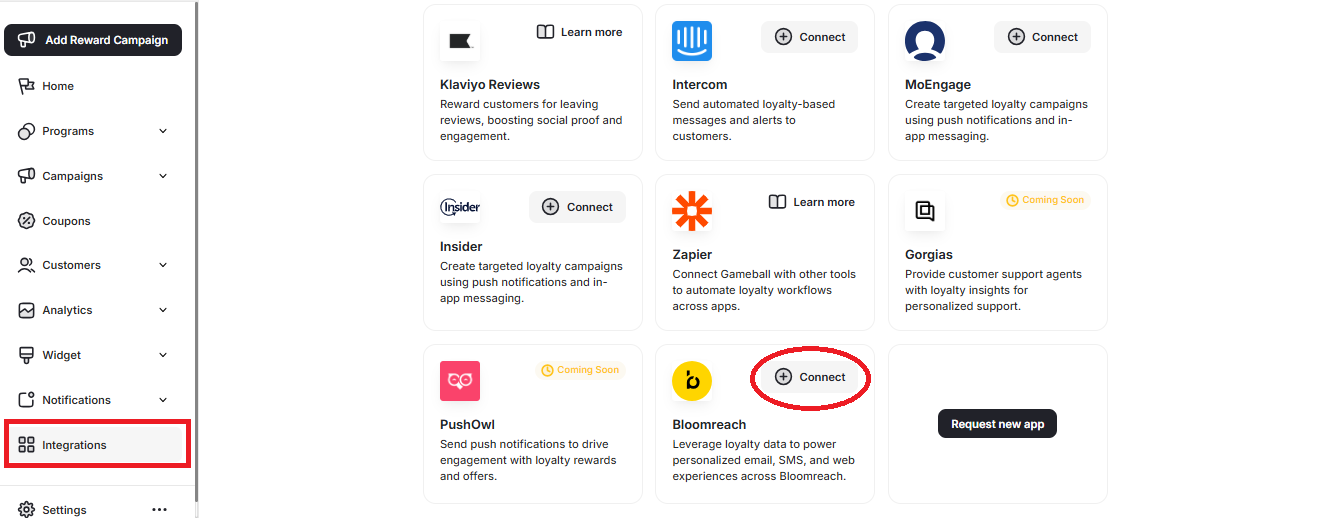
Copy and Paste API Base URL
- In your Bloomreach account, go to Settings > Project Settings > Access Management > API.
- Copy the API Base URL.
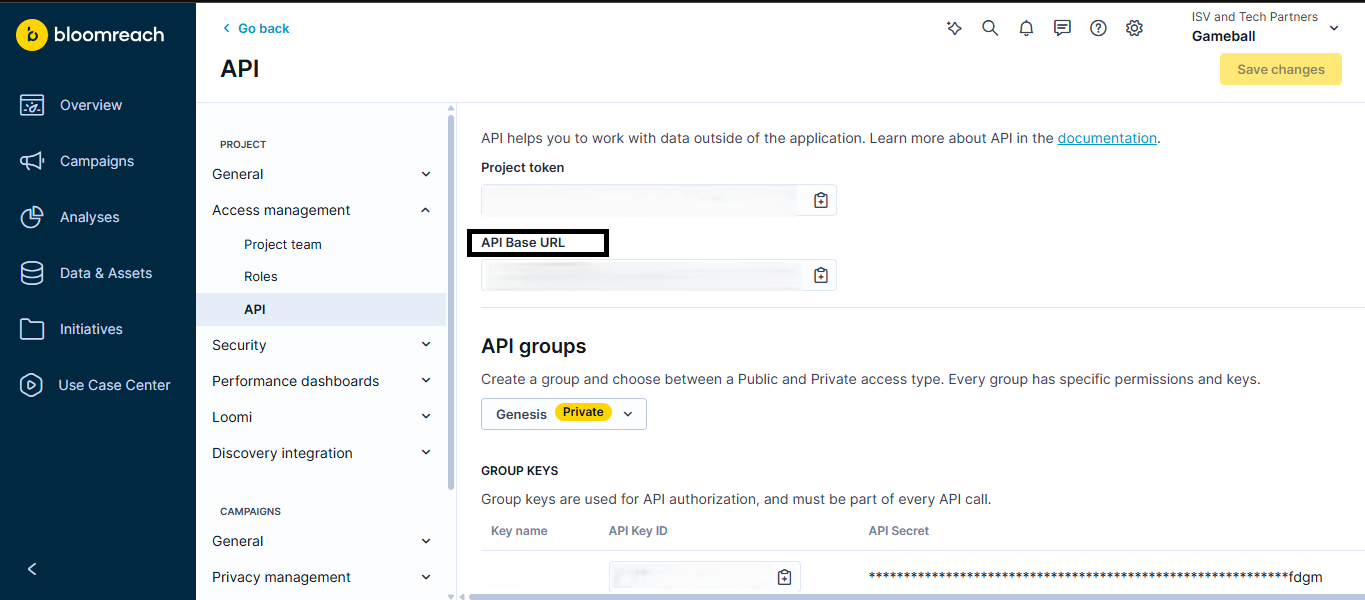
- Go back to your Gameball dashboard and paste the URL.
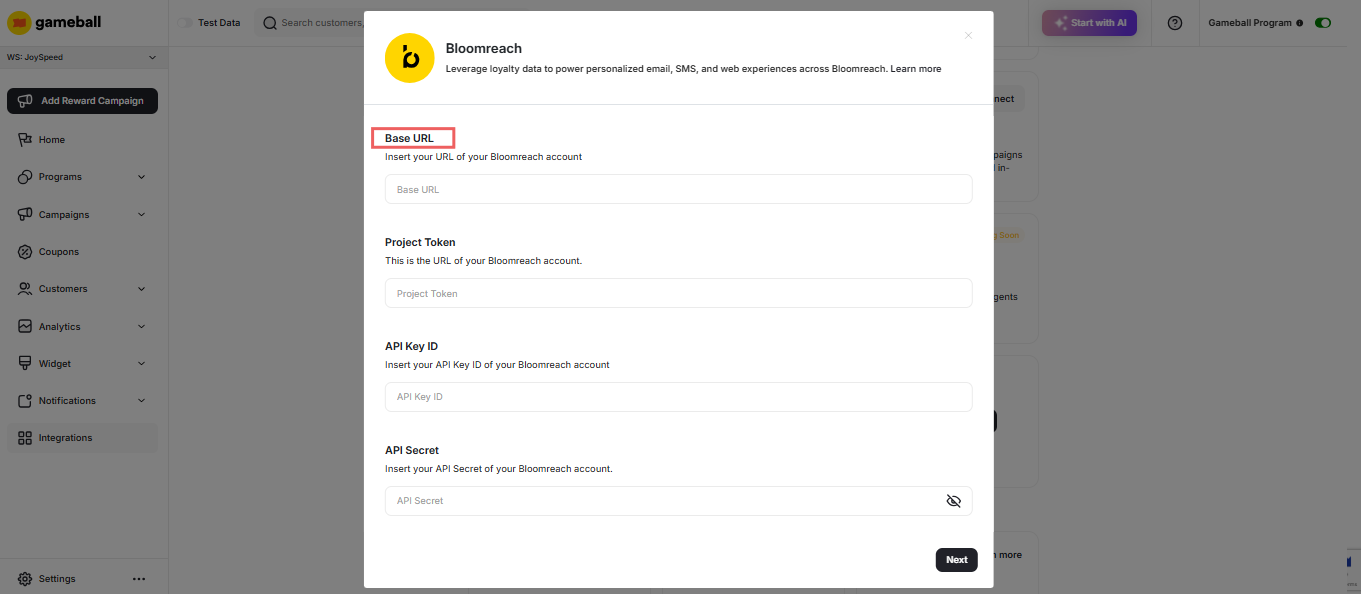
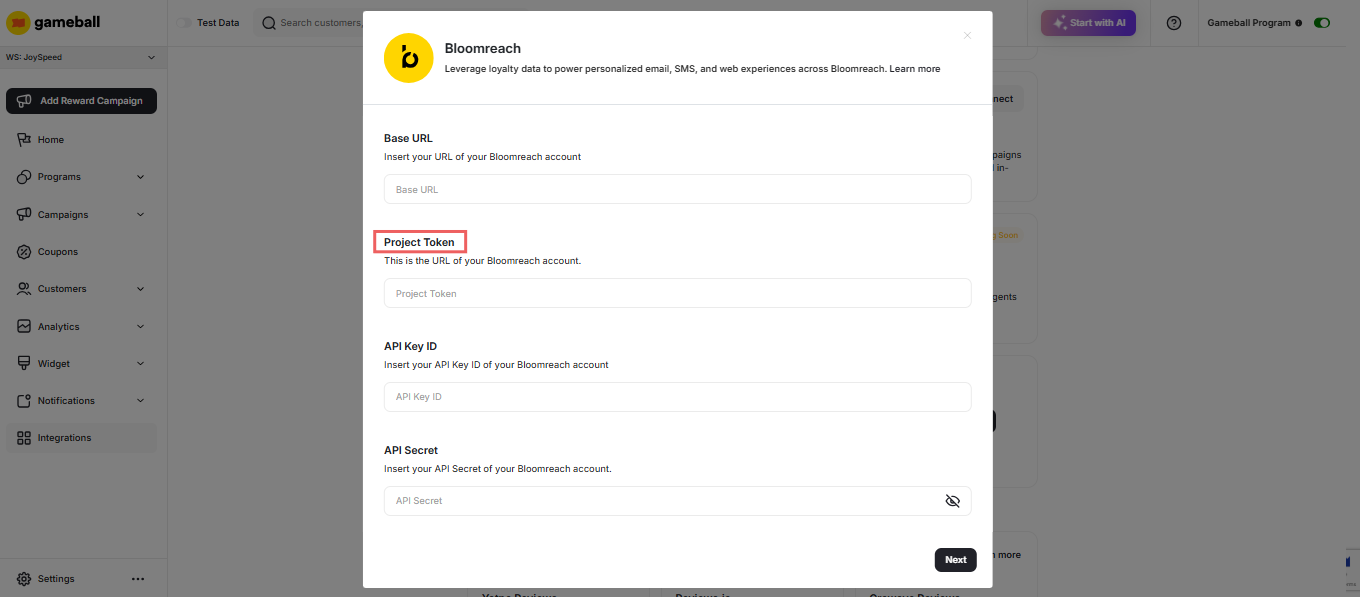
Copy and Paste Project Token
- In your Bloomreach account, go to Settings > Project Settings > Access Management > API.
- Copy the Project Token.
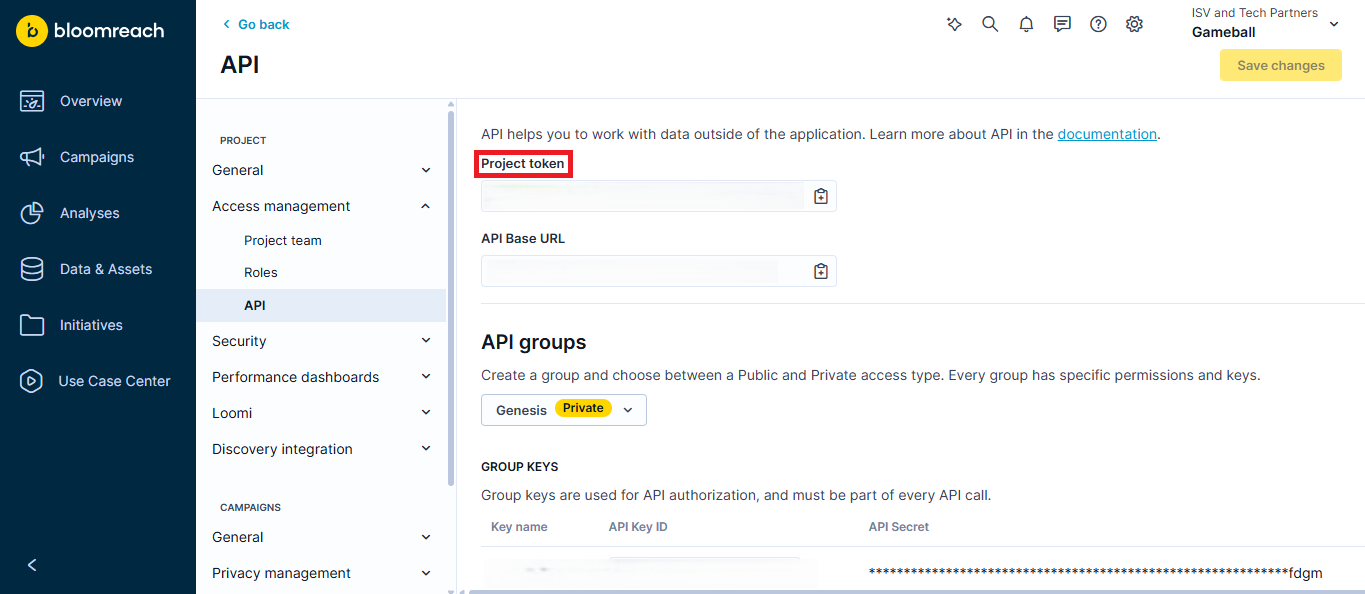
- Go back to your Gameball dashboard and paste the Token.
Create a Private API Group in Bloomreach
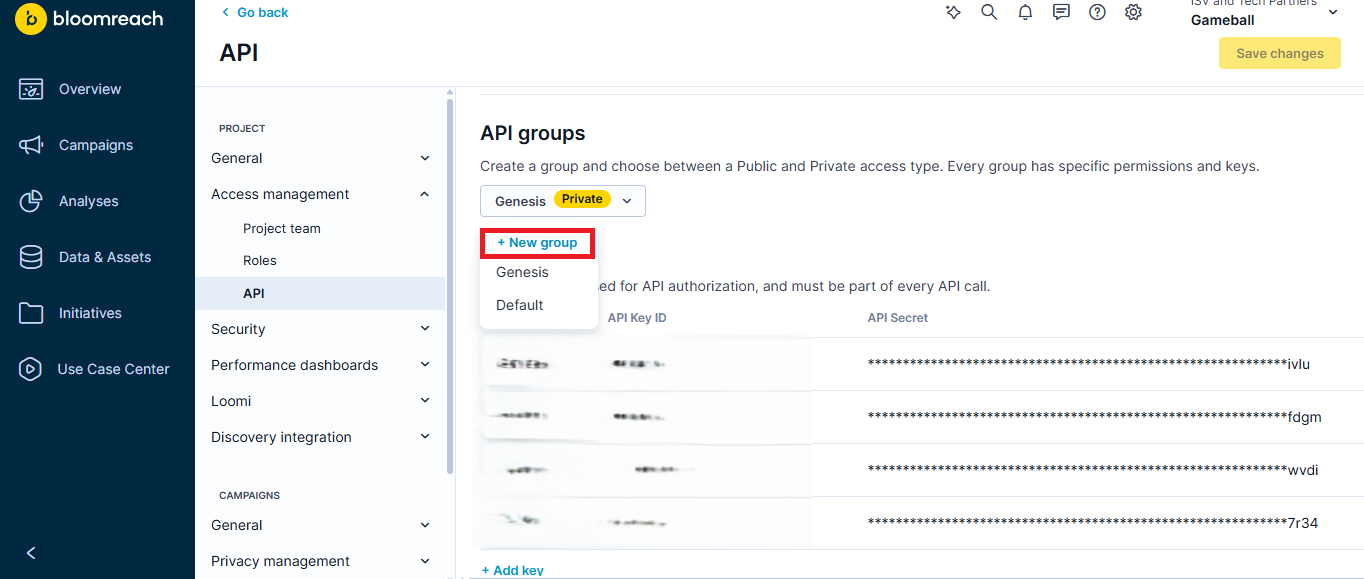
- In your Bloomreach account, go to Settings > Project Settings > Access Management > API.
- Scroll down and click New Group.
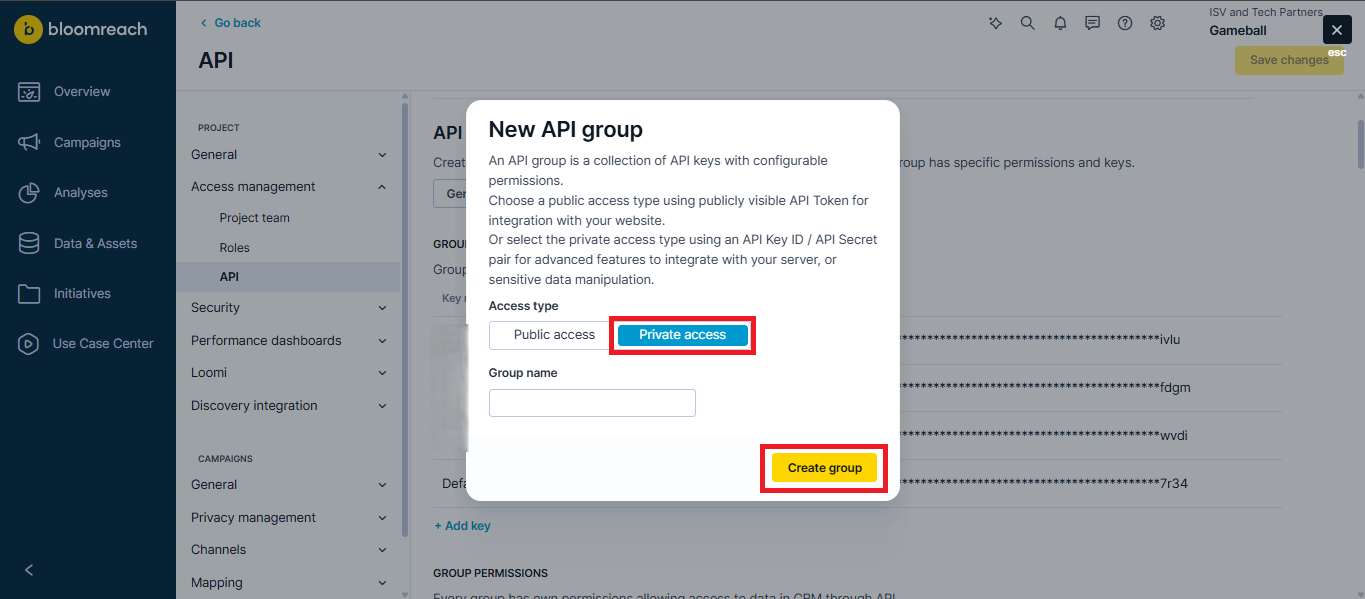
- Choose Private Access, add a group name, and click Create Group.
- Give permissions to the new API Group:
- Customer Attributes: Get and Set
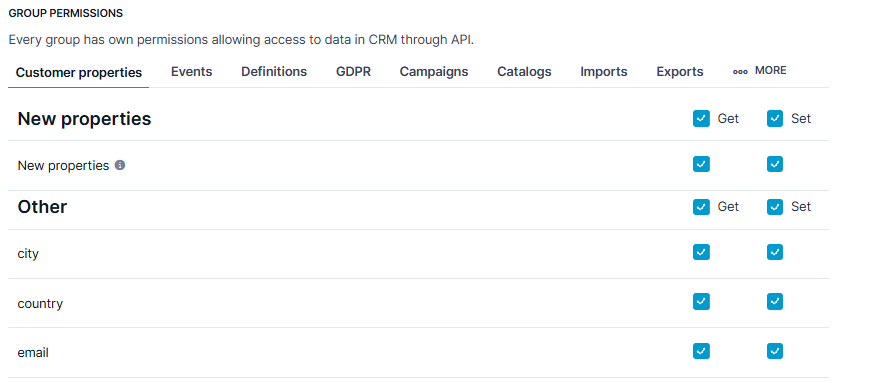
- Events: Set

Add a New Key in Bloomreach
- Choose the new group created from the last step.
- Click Add Key.
- Enter a key name.

Copy and Paste API Key ID and Secret
- Copy the API Key ID and API Secret.
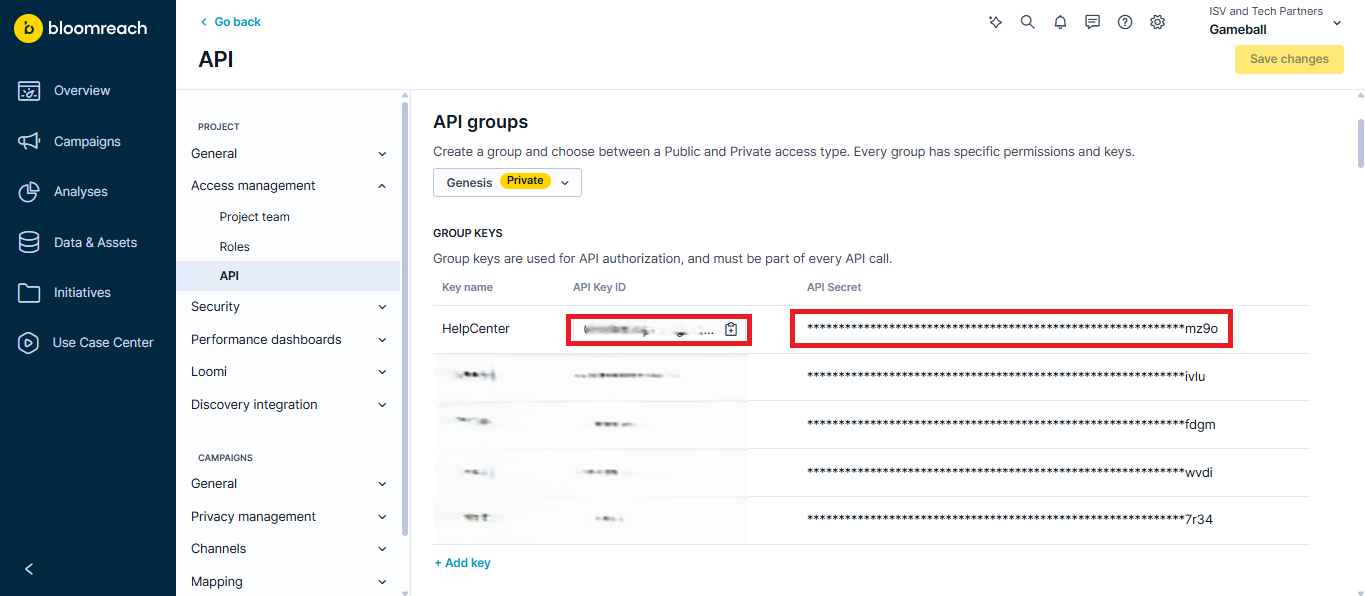
- Paste both keys in Gameball accordingly.
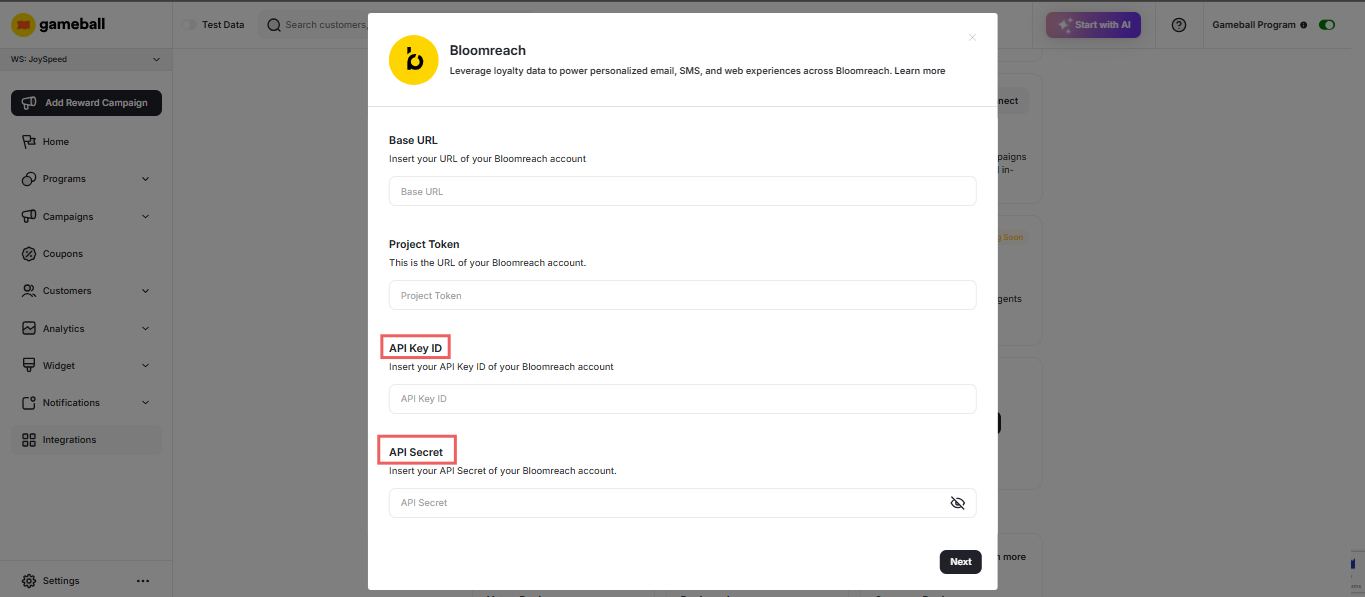
Map Gameball Events to Bloomreach
Gameball tracks various customer events (e.g., points earned, redeemed, tiers achieved). Map these events to Bloomreach to use them in your campaigns.
- In the Gameball Dashboard, go to Integrations.
- Select Bloomreach from the list of available integrations.
- Map the following events:
- Coupon Created
- Coupon Redeemed
- Reward Campaign Achieved
- Order Placed
- Confirm the event mappings and save.
Sync Customer Data
Syncing customer data ensures Bloomreach receives real-time updates about customer actions.
- In the Gameball Dashboard, navigate to Integrations > Bloomreach.
- Enable the Customer Sync toggle.
- Choose the customer attributes to sync (Customer ID, Date of Birth, Join Date, Tier Name, Wallet Points, Pending Points, Tier Progress, Tier ID, Completed Reward Campaigns, Referral Code, Referral Link, Tags and Segments).
- Save your settings.
Verify Synced Customers
In Bloomreach, go to Data and Assets > Customers to find a table with all automatically synced Gameball customers.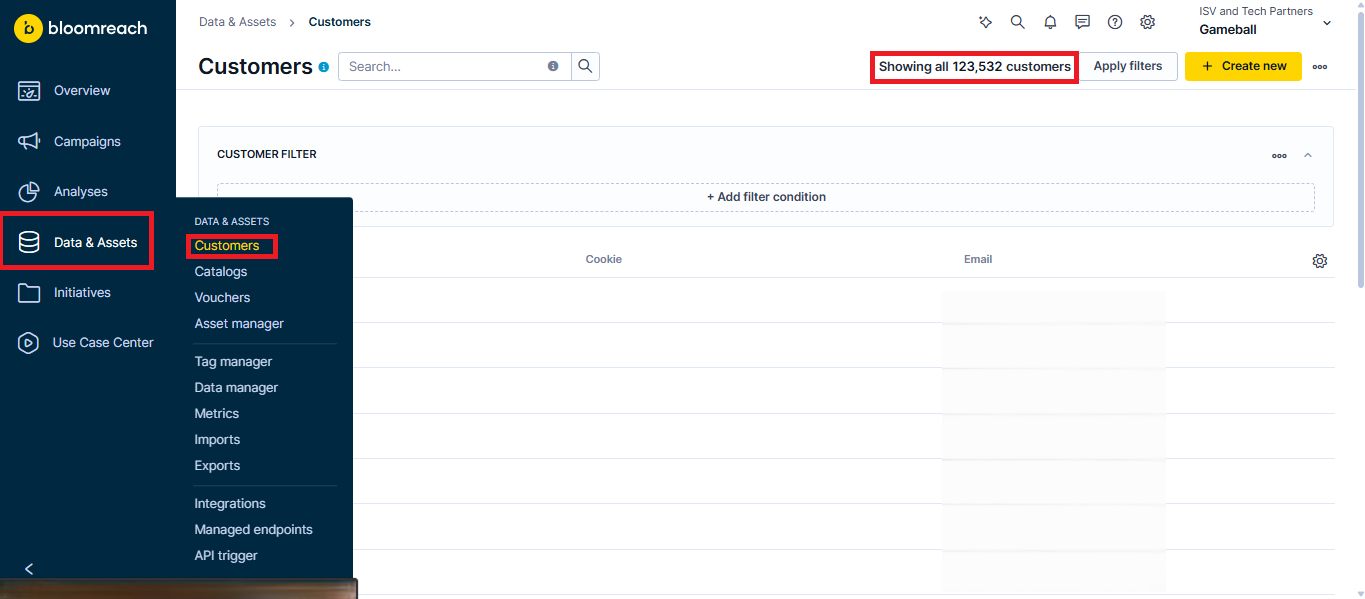
Gameball on Zapier
Connect Gameball with thousands of apps via Zapier.
Apps & Integrations Overview
Explore all available Gameball integrations.