Understand the way Gameball deals with both partial and full refunds.
Understanding the complications that come with refunding a fully or partially canceled order, Gameball treats every case differently. Here is how Gameball handles your refunds.When fully or partially refunding any order, Gameball handles the related cashback that took place when the order was first completed.
All examples below assume that the cashback value you set allows customers to earn 1 point for every 1 USD.
When a full refund is needed because of a canceled order, Gameball deducts the entire point reward that was granted as a reward when the order was first placed.
Full and Partial Refund — Entirely Paid Using Points Balance
If a customer decides to make an order and pay for it using the points they have previously earned and saved, then they will not need to make any form of monetary transaction.In this case, Gameball does not reward the customer with cashback points, and upon partial or full refund, Gameball returns the points spent accordingly.
Customer’s Action
Gameball Automated Reaction
Customer buys a product with 100 points worth 100 USD
No cashback reward is granted due to a zero payment amount
Customer returns items with a value of 20 USD
Return 20 points to the customer’s points balance
Customer returns another item with a value of 80 USD
Return 80 points to the customer’s points balance, leaving them with their original 100 points
Full and Partial Refund — Partially Paid Using Points Balance
If a customer decided to make an order and pay using both points balance and actual payment, then Gameball would only reward them with cashback based on the paid amount and would disregard the part paid by points.Here is how Gameball deals with the refund based on the previous case:
Customer’s Action
Gameball Automated Reaction
Customer buys a product with 100 USD (pays 60 USD and uses 40 points to pay for the rest)
Reward them with 60 points based on the actually paid amount only
Customer returns items worth 80 USD
Deduct the rewarded 60 points + return 20 points to the customer’s point balance
Special Case: Refunding a Value Greater Than the Remaining Cashback Reward
Gameball will refund the whole cashback reward and not the extra value.
Customer’s Action
Gameball Automated Reaction
Customer buys a product worth 100 USD
Reward them with 100 points
Customer returns an item for 20 USD
Deduct 20 points from their rewarded 100 points
Customer returns an item for 20 USD
Deduct another 20 points from the remaining 80 points
The cashier or the system makes a refund of 100 USD
Deduct 60 points, for it is the only point reward left to be deducted from this particular order ID
Any system using coupons as a redemption method, such as Shopify, etc. The redemption part will be neglected.
The refund will be based on the reward accumulated for the customer at the time of the transaction, not based on the cashback configuration at the time of the reimbursement.
As the system is behaving now, the customer balance can go negative if they redeem points after receiving the cashback reward; then, the Gameball user refunds the original transaction.
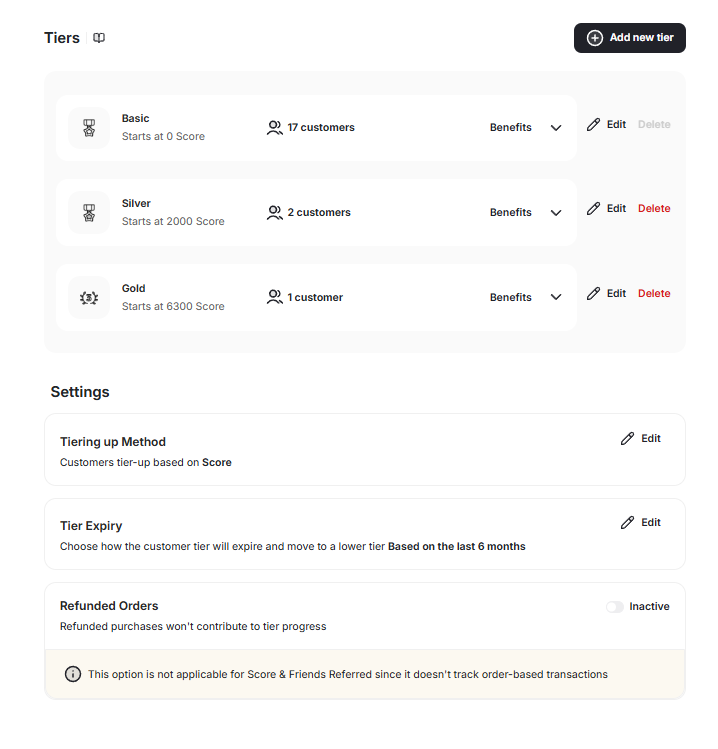
How Will Customer Tiers Be Affected by the Refund?
Gameball gives you more control over how refunds affect tier progress. You can choose whether refunded orders contribute to customers’ tier advancement, ensuring your loyalty logic stays aligned with your business rules.
Go to Dashboard > Programs > VIP Tiers. Scroll down to the toggle under Tier Program Settings and exclude/include refunded orders from tier progress.
Setting
Behavior
Enabled
Refunded orders do not count toward tier progress, and any earned progress from them is deducted
Disabled (default)
Refunded orders remain included in tier progress calculations
Tier progress in both the dashboard and widget automatically reflects the updated calculation. Progress reductions from refunds are shown in real time.