

Overview
You can reward customers with points for every achievement they complete through your customized loyalty program. These points can then be redeemed in the form of coupons to be used later on new orders. Gameball allows you to choose the type of reward coupons customers can receive and enjoy. Learn more For a coupon to be created by Gameball, there must first be a backend connection between Gameball and your couponing engine to keep track of your coupons. This way, Gameball can ping your couponing engine to get the required information for a coupon creation like start date, expiry date, code, etc., and the created coupon can sync with real-time orders and be put into action.If your platform is built using a third-party plugin such as Shopify, the couponing sync takes place automatically due to the existence of an already built-in couponing system. These internal coupon engines automatically manage your coupon creations without any effort from your side.
How to Allow Gameball to Create Coupons
Navigate to Coupon Configurations
On your Gameball Admin Dashboard, on the left bar, choose Settings > Admin Settings > Coupon Configurations under Coupons.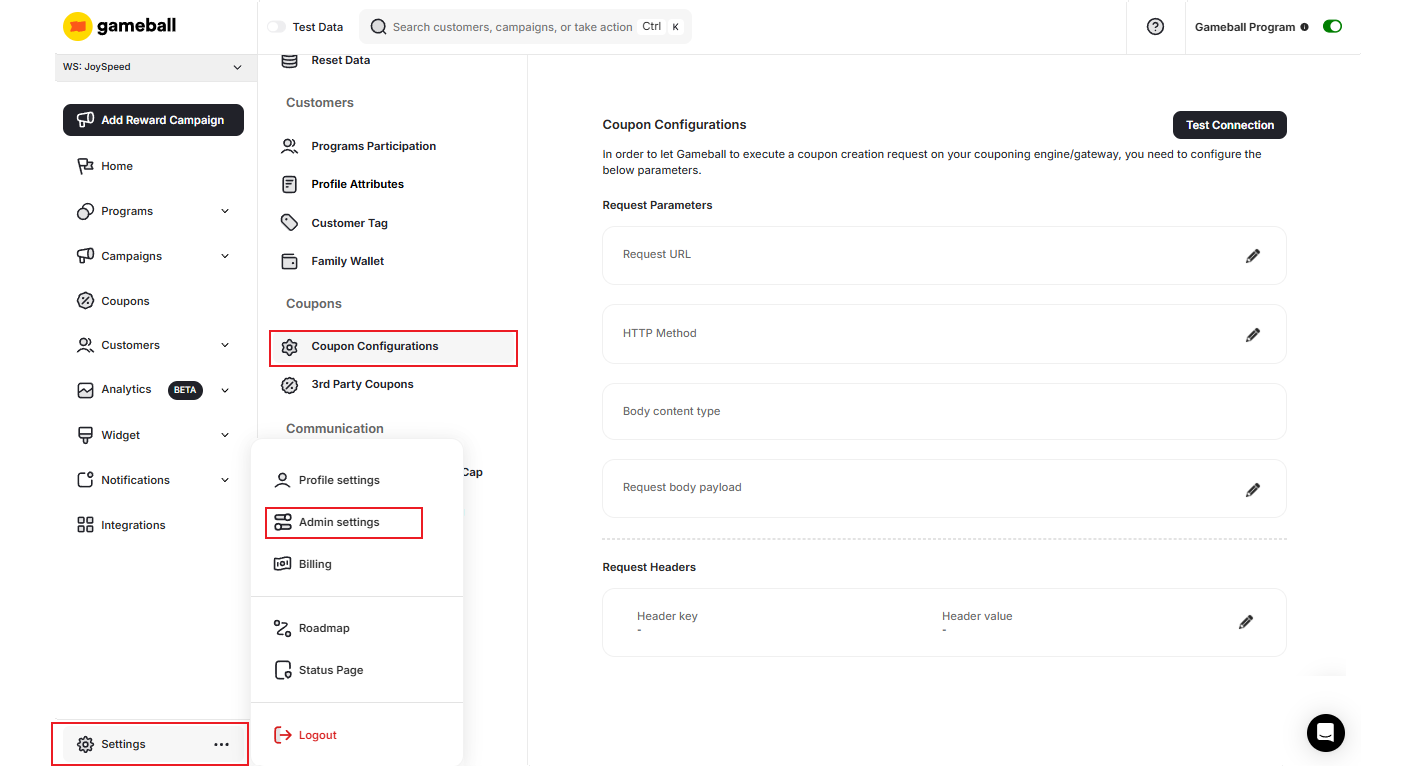
Fill in the Connection Details
Fill in the following details to establish the backend connection between Gameball and your couponing engine:
Follow this technical integration guide for further help.
Request Parameters
Request Parameters
Define the parameters that will be included in the coupon creation request sent to your engine.
Request Headers
Request Headers
Set up the required headers for authenticating and routing the API request to your engine.
Query Parameters
Query Parameters
Specify any query parameters required by your couponing engine’s API.
Related Articles
Third-Party Coupons Through the Gameball Dashboard
Learn how to upload and manage third-party coupon codes directly from your Gameball dashboard.