

Plan Availability
- Shopify & Salla
- Self Serve
| Feature | Available |
|---|---|
| API Key & Secret Key | Guru |
Accessing Account Integration Settings
You can access your Account Integration settings section in Gameball Admin Dashboard through Settings > Admin Settings > Account Integration.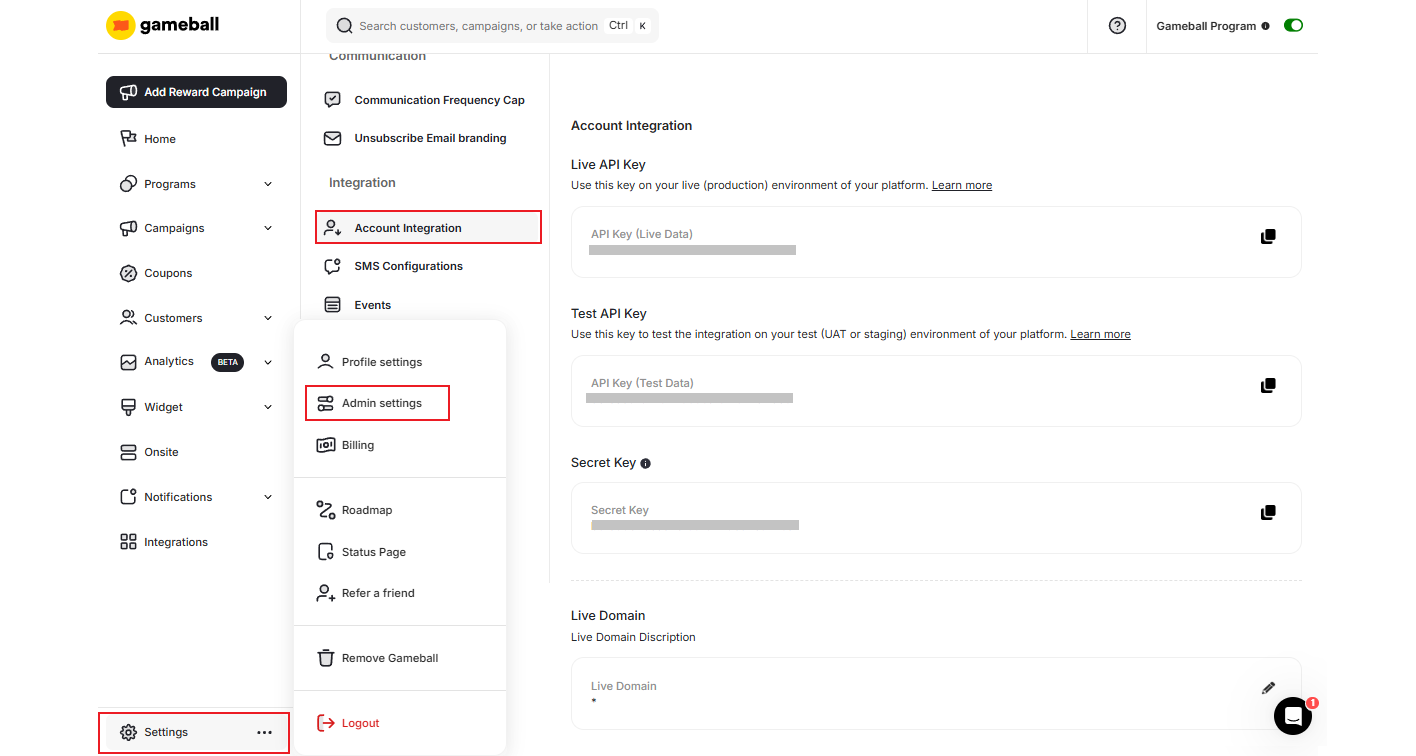
Integration Keys
Live API Key
Live API Key
This is your account key, which will be used in the integration between your platform and Gameball.
Test API Key
Test API Key
This is your account key, which will be used for test environments.
Secret Key
Secret Key
This is your account points transactions key. It will be used with all points transactions APIs.
High Security Mode for API Authentication
High Security Mode for API Authentication
When enabled, this mode ensures that all API requests are verified and secure, preventing unauthorized access and data exposure. This feature is disabled by default and can be easily activated in the Integration settings within the Admin panel. Once enabled, any integration that previously required only an API key will now also require a Secret Key, ensuring that even if the API key is exposed, it cannot be misused.
API & Secret Key Rotation
API & Secret Key Rotation
You can now secure your accounts by rotating keys without affecting your existing platform connections, helping them comply with security best practices (e.g., periodic credential rotation) and mitigate potential key exposure risks.
| Feature | Details |
|---|---|
| Individual Key Rotation | API keys and Secret Key can each be rotated separately with dedicated actions |
| Immediate Replacement | Upon rotation, a new key is generated instantly and the old key is immediately disabled |
| Automated Updates for Shopify & Salla | Rotated keys are automatically updated in connected Shopify and Salla stores — no manual update needed |
| Access Control | Only Admins, Workspace Owners, and Workspace Admins can rotate keys; configurable with custom roles |
Related Articles
Test and Live Data
Understand the difference between test and live API keys and when to use each.
Gameball Integration with your Web App
A complete guide to integrating Gameball with your web application.
Gameball Integration with your Mobile App
A complete guide to integrating Gameball with your mobile application.
Publish Gameball Experience
Learn how to publish the Gameball experience and widget on your store.